Diaflow Black Weeks: Bonus Credits for Google AI Models
23 NOV 2026
The Diaflow Black Weeks Offer is scheduled to run from 7:00 p.m. SGT (UTC+8) on November 23, 2026, through 11:59 p.m. SGT on December 31, 2026, unless Diaflow pauses or ends it earlier under the Terms. Eligible customers can receive Bonus Credits for selected Google model usage in Diaflow. Workspace limits range from US$100 to US$3,000, subject to plan eligibility and capacity in the US$80,000 shared pool. Diaflow must accept a request while the Offer is open for the usage to qualify.

What the Diaflow Black Weeks Offer includes
The Offer provides eligible Diaflow customers with Bonus Credits for eligible usage of selected Google models. The total pool is US$80,000 across participating workspaces.
Bonus Credits are allocated to an eligible workspace and can cover qualifying model usage during the Offer period. Diaflow sets aside the workspace's full plan limit when it issues an allocation. A claim does not reserve pool capacity. Diaflow may stop issuing new Bonus Credits when the remaining unallocated pool cannot cover another eligible plan's full limit.
The Offer ends at 11:59 p.m. SGT on December 31, 2026, unless Diaflow ends it earlier under the Terms. Unused Bonus Credits expire when the Offer ends. They cannot be carried forward, refunded, or transferred. An exhausted shared pool can stop new allocations, but it does not by itself change the expiry date of credits already issued.
Eligible plans and Bonus Credit limits
The following paid plans qualify. Limits apply per eligible workspace.
Eligible plan | Maximum Bonus Credits per eligible workspace |
|---|---|
Starter Annual | US$100 |
Team Monthly | US$500 |
Team Annual | US$3,000 |
These amounts are maximum coverage limits for eligible model usage. Bonus Credits have no cash value. They are not refunds or subscription credits, and they do not guarantee that the full limit will be used.
Free and trial plans, Starter Monthly, Business, custom Enterprise, and legacy Pro plans are not eligible. Test accounts, accounts created for testing, refunded or disputed subscriptions, and accounts that violate the Diaflow Terms of Service are also ineligible.
How workspace eligibility works
The claim rules differ for new and existing customers:
New customers: Create a Diaflow account, verify the email address, and purchase an eligible paid plan during the Offer. Each eligible workspace may receive the Bonus Credits for its plan, even if another workspace belongs to the same organization.
Existing customers on an eligible plan: An eligible workspace must have an active, paid subscription. An existing customer may claim for one eligible workspace they administer or own. A workspace admin, owner, or primary owner may claim.
Existing customers on another plan: Upgrade to an eligible paid plan during the Offer. A workspace admin, owner, or primary owner must claim for one eligible workspace they administer or own. The upgrade must be completed and paid, and the claim must be approved before the Offer ends and while the pool has capacity for that plan limit.
A workspace can receive one allocation during the Offer. Existing customers may claim for only one eligible workspace. A new customer may receive one allocation for each separate workspace that becomes eligible through its own paid plan during the Offer. Renewals, another admin, another payment, or an account change do not create a second allocation for the same workspace.
Which Google models are covered?
Bonus Credits cover eligible usage of the following models when they are available in Diaflow, identified as Google models in the product, and used during the Offer period:
LLMs: Gemini 3.5 Flash, Gemini 3.6 Flash, Gemini 3.7 Flash, Gemini 3.8 Flash, Gemini 4 Hydro, Gemini 4 Carbon, Gemini 4 Argon, and Gemini 4 Neon
Image models: Nano Banana, Nano Banana 2, and Nano Banana Pro
Video models: Veo 3.1 (Fast), Veo 3.1, Omni 1.2 Flash, and Omni 1.1 Flash
Audio models: Lyria 3 Pro and Lyria 3 Clip
Usage of models from other providers or models not listed above is not covered. Bonus Credits also exclude add-ons, storage, workflow services, taxes, subscription fees, and third-party charges. Google or Diaflow may change, rename, limit, or remove a model. Diaflow may update the eligible model list on the official Offer page.
Submit a claim during the offer period and identify an eligible plan. If you already have an eligible subscription, it must be active and paid when you submit your claim and when the covered usage occurs.

How to claim your Diaflow Black Weeks Bonus Credits
New customers may submit a claim after selecting an eligible paid plan during checkout. Diaflow applies Bonus Credits only after the purchase is complete, payment is confirmed, and the subscription is active. If the purchase is not completed or payment fails, no Bonus Credits are granted.
Step 1: Check your workspace plan
Confirm that your workspace has an eligible paid subscription: Starter Annual, Team Monthly, or Team Annual. The maximum coverage limit is US$100, US$500, or US$3,000 per eligible workspace, respectively.
If your current plan is ineligible, you must complete and pay for an upgrade to an eligible plan before submitting a claim. The upgrade must be completed before the offer ends and while shared pool capacity remains. Any proration or billing adjustment appears in the plan-change flow.
Step 2: Find the Bonus Credits offer and submit a claim
Look for the pop-up notification about claiming additional Bonus Credits and follow the instructions shown.
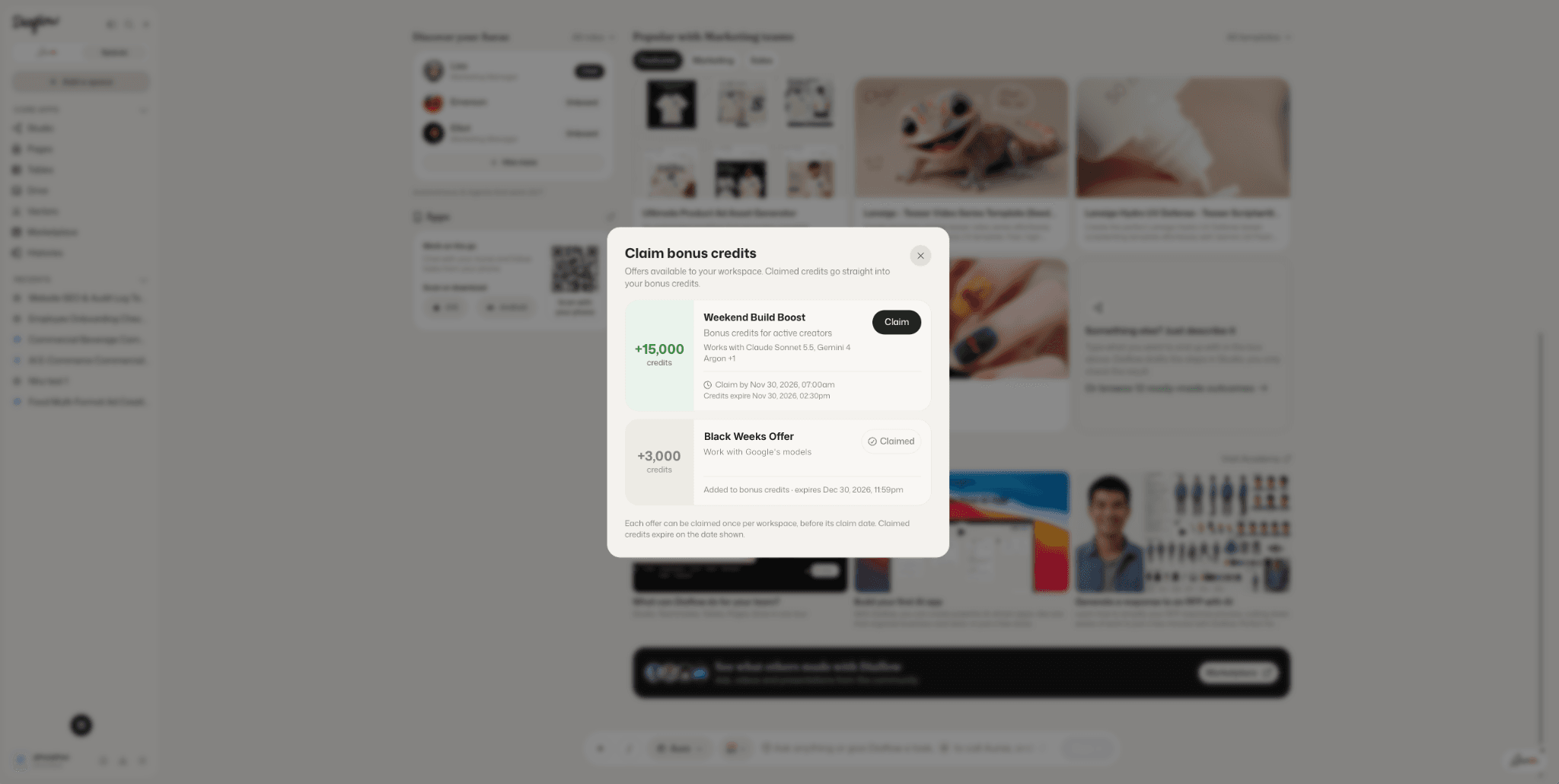
If the pop-up does not appear, check the Billing section for the offer.
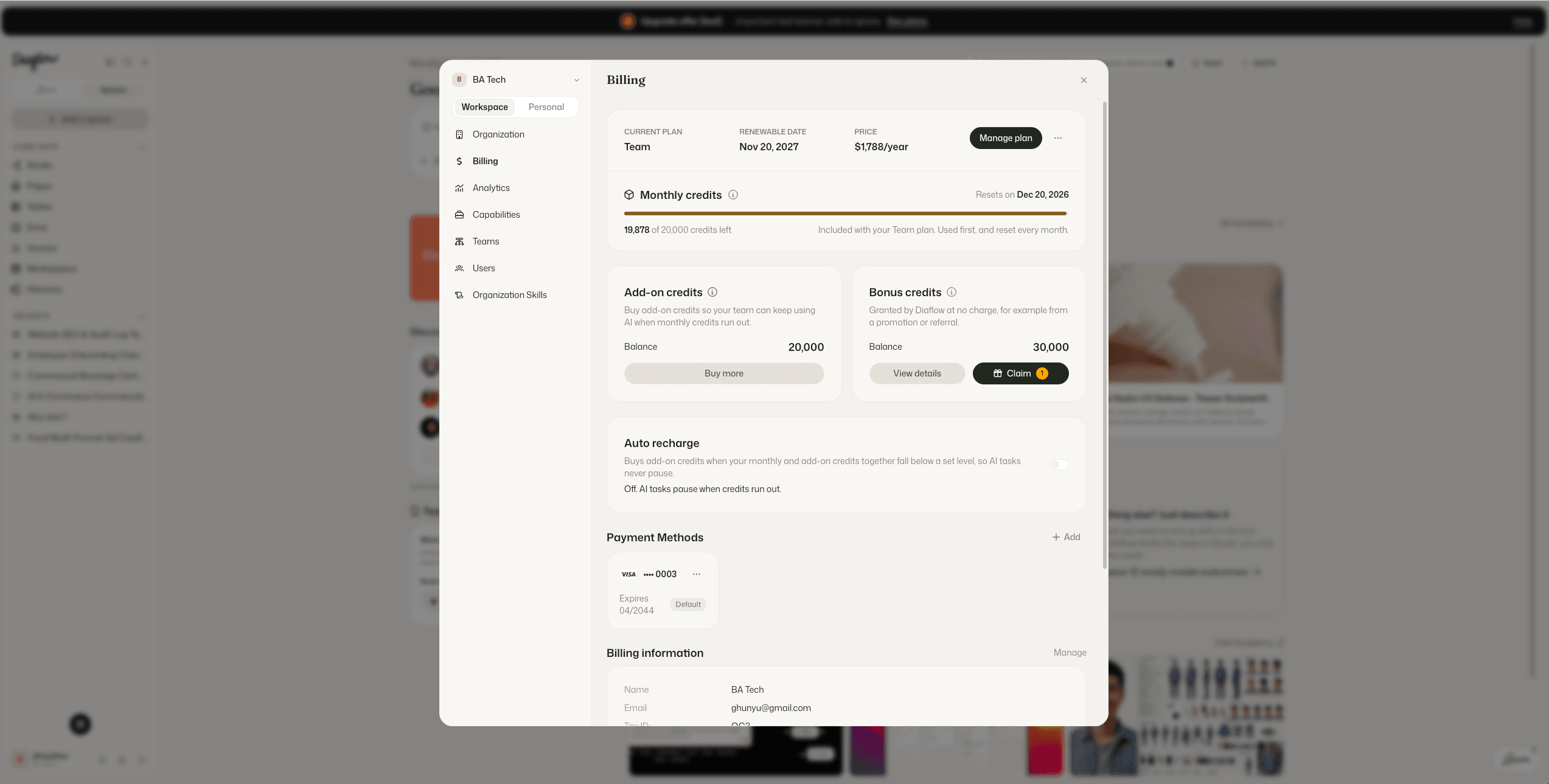
Diaflow reviews the claim before applying Bonus Credits. Eligibility and available pool capacity must be confirmed. Submitting a claim does not hold or reserve a portion of the shared pool.
Step 3: Check your active Bonus Credits
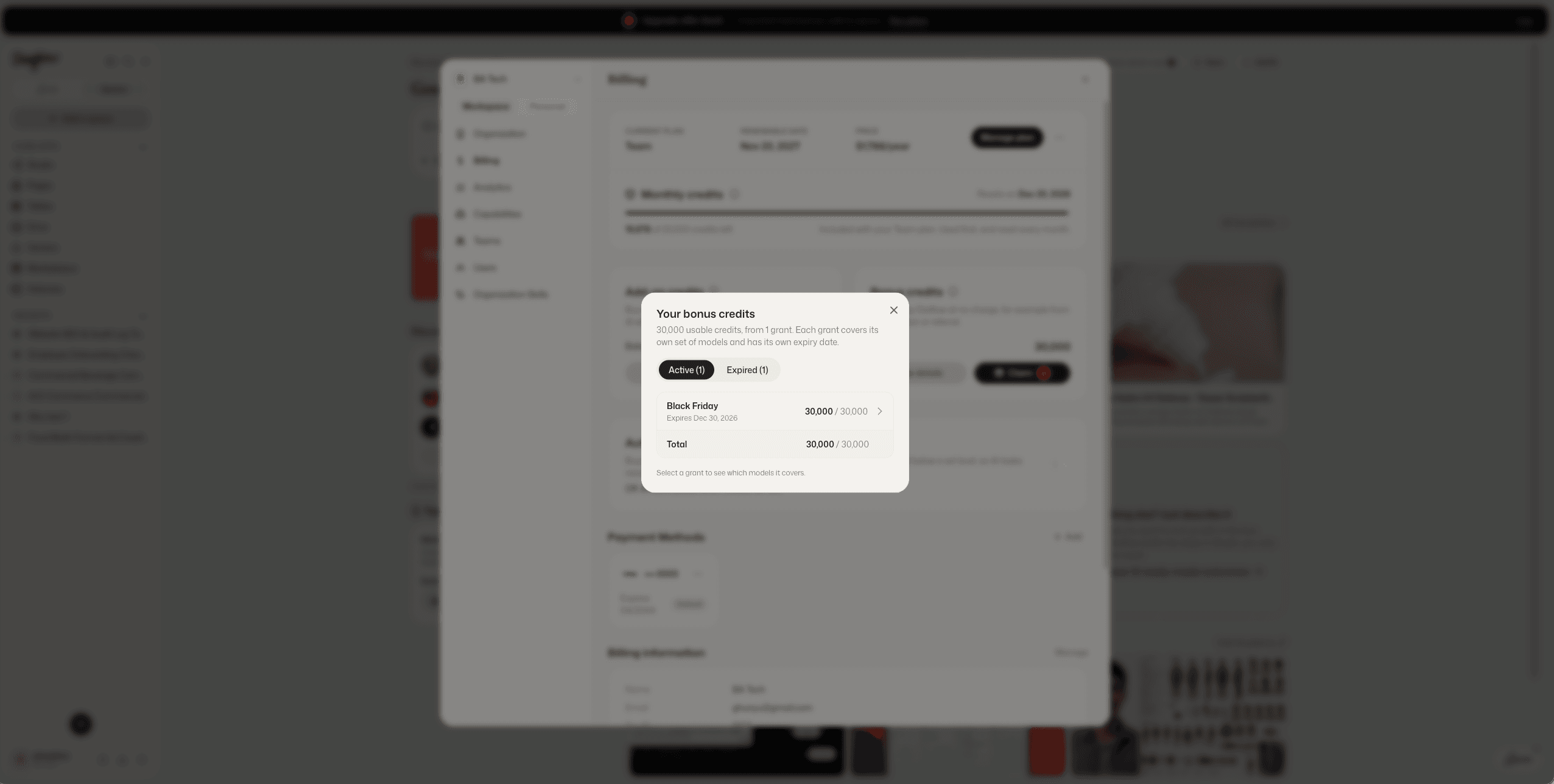
After Diaflow approves the claim, check the active Bonus Credits amount shown for your workspace. The amount available depends on your eligible plan, any qualifying usage already covered, verification, and remaining pool capacity.
For account usage records, sign in to platform.diaflow.io and go to Account Settings → Usage.
How Bonus Credits are applied
Bonus Credits cover eligible model usage costs recorded for the receiving workspace, up to that workspace's available balance. When a request qualifies, Diaflow applies available Bonus Credits first, followed by standard plan credits and then any available add-on credits. Diaflow will not charge an uncovered amount unless the customer authorizes that charge in the applicable product or billing flow. If available credits cannot cover a request, Diaflow may block it or ask the customer to authorize an additional charge before processing.
Diaflow measures usage with workspace-level product records and provider billing data. Eligible costs are recorded in US dollars. Diaflow may correct verified billing or measurement errors. The full Bonus Credit limit is set aside from the shared pool when Diaflow issues an allocation. Unused allocated credits are not reassigned after expiry.
For an in-progress job or workflow, Bonus Credits apply only to eligible model usage that occurs while the Offer is open, the subscription remains eligible, and Bonus Credits remain available in the workspace. Diaflow must accept a request while the Offer is open for it to qualify. Submitting a job before the deadline does not extend Bonus Credit eligibility to usage that occurs after the Offer closes or after the workspace's Bonus Credits run out.
Google model use remains subject to provider availability, quotas, and policies, as well as Diaflow's service limits and Terms of Service. The Offer does not guarantee continuous access, a specific processing speed, or use of the full Bonus Credit limit.
Plan changes, cancellations, and expiry
The subscription must remain active and paid for new usage to qualify. If you cancel, downgrade to an ineligible plan, receive a refund where required by law, or have a payment reversed or disputed, Diaflow may pause unused Bonus Credits while it checks eligibility. If the workspace is no longer eligible, unused Bonus Credits are forfeited. A later upgrade does not restore forfeited credits or create another allocation.
If a workspace moves to a higher eligible plan during the Offer, Diaflow may increase its total Bonus Credit limit to the higher plan's limit, less eligible usage already covered and subject to remaining pool capacity. A move to a lower eligible plan does not increase the limit. Renewals, upgrades, cancellations, or workspace transfers do not create a second allocation.
Unused Bonus Credits expire when the Offer ends on December 31, 2026, or earlier if Diaflow ends the Offer under the Terms. Expired credits cannot be carried forward, refunded, or transferred.
FAQ
When does the Diaflow Black Weeks Offer start and end?
The Offer starts at 7:00 p.m. SGT (UTC+8) on November 23, 2026, and ends at 11:59 p.m. SGT on December 31, 2026, unless Diaflow pauses or ends it earlier under the Terms. Diaflow must accept a request while the Offer is open for the usage to qualify.
Who can claim Bonus Credits for an existing workspace?
A workspace admin, owner, or primary owner may claim for an eligible workspace they administer or own. An existing customer may receive an allocation for only one eligible workspace during the Offer.
Can new customers receive credits for more than one workspace?
Yes. Each separate workspace that becomes eligible through its own paid plan purchased during the Offer may receive one allocation, even if multiple workspaces belong to the same organization. The active, paid subscription and other eligibility requirements must be met.
How much can each workspace receive?
The maximum is US$100 for Starter Annual, US$500 for Team Monthly, and US$3,000 for Team Annual. These are coverage limits for eligible model usage. The applicable subscription must qualify, and the shared pool must have capacity when Diaflow issues an allocation.
Does a Team Monthly renewal reset the limit?
A monthly renewal does not create or reset an allocation. A workspace can receive Bonus Credits only once during the Offer, subject to the plan-change rules in the Terms.
What happens if the shared pool has no capacity?
Diaflow may stop issuing new Bonus Credits when the remaining unallocated pool cannot cover another eligible plan's full limit. A claim does not reserve capacity. Bonus Credits already issued expire under the Offer's expiry rules, not simply because new allocations have stopped.
What if I cancel or change my plan?
The subscription must remain active and paid for new usage to qualify. Diaflow may pause unused Bonus Credits after a cancellation, downgrade to an ineligible plan, refund, reversed payment, or dispute while it checks eligibility. A higher eligible plan may increase the total limit, less eligible usage already covered and subject to pool capacity.
How do I check Bonus Credit usage?
Sign in to platform.diaflow.io and go to Account Settings → Usage to review Bonus Credits used and remaining for your workspace.
How do I appeal a decision about Bonus Credits?
Email [email protected] within 7 business days after Diaflow sends notice of a denial, pause, adjustment, or revocation. Use the subject line Black Weeks Offer Appeal. Include your Diaflow account email, workspace name or ID, the decision, and relevant facts or documents. Do not send full payment-card details or passwords.
Diaflow will acknowledge the appeal within 2 business days. It will email a decision within 10 business days after receiving the information needed to review the appeal. The Terms explain how disputed Bonus Credits may be held while an appeal is pending.
Check your usage and read the full Terms
To review Bonus Credits used and remaining for your workspace, sign in to platform.diaflow.io and go to Account Settings → Usage.
Read the Diaflow Black Weeks Offer Terms and Conditions for the full eligibility requirements, model usage rules, pool mechanics, appeal process, and other restrictions.
Claim the Diaflow Black Weeks Offer