AI In Marketing Automation, What It Is, Use Cases, And A Practical Starter Framework
23 SEPT 2026
AI in marketing automation means using probabilistic models (machine learning and generative AI) to decide, generate, or optimize marketing actions based on data and context, not just fixed if-then rules. For modern B2B teams in the US and AU, the practical goal is simple: reduce manual ops while improving speed and relevance without risking brand, compliance, or deliverability.
- AI-driven automation differs from rule-based automation because it can infer intent, generate variants, and optimize decisions, but it also needs guardrails and review thresholds.
- Start with use cases where you can measure lift quickly (time saved, conversion rate, pipeline velocity), then expand only when data quality and governance are proven.
- A 30-60-90 day plan works best when you map each AI capability to a clear KPI, minimum data requirements, and a human-in-the-loop review rule.
The Agitation: Why AI in marketing automation is costing you time and pipeline
AI in marketing automation is costing teams time and pipeline when it is layered on top of messy data, fragmented tools, and unclear ownership. The cost of inaction is not just “being slower,” it is burning high-intent leads through mistimed follow-ups, shipping inconsistent messaging across channels, and spending skilled marketer hours on copy-paste operations that should be systemized.
- Time cost: If your team is still manually turning a brief into variants, UTM conventions, channel-specific formats, and weekly performance updates, your “automation” is really just task switching. The hidden tax is context loss and rework, especially when approvals happen in email threads.
- Pipeline cost: Lead response time matters most when intent spikes. When routing or nurturing is delayed because someone needs to “clean the list” or “rewrite the email,” the lead cools and your SDR team inherits lower-quality conversations.
- Reputation cost: AI-generated content without deliverability and compliance checks can hurt domain reputation, trigger spam complaints, or create policy risk for regulated categories.
In our experience working with lean B2B teams, the biggest failure mode is treating AI like a content vending machine instead of a decision system with inputs, thresholds, and audit trails. When the inputs are unclear, the outputs feel random, and the team stops trusting the automation even when it occasionally works.
The strategic blueprint to overcome AI marketing automation failure
A reliable AI marketing automation program follows a small set of steps that turn “cool capabilities” into measurable, governed workflows. Use this 5-step blueprint before you buy, build, or connect anything.
- Define the decision being automated (not the asset): Write one sentence: “When signal happens, we will action for segment, aiming for KPI.” Example: “When a lead hits the pricing page twice in 7 days, we send a 3-email sequence and notify the owner, aiming for higher meeting rate.”
- Classify the automation type: Decide whether this is rule-based, predictive (ML), language-based (NLP/genAI), or agentic orchestration. Each class has different data needs and failure modes.
- Set guardrails and review thresholds up front: Decide what must be human-approved (brand voice, legal claims, segmentation changes) versus what can run automatically (formatting, enrichment, summarization). Put it in writing.
- Choose a “single source of truth” for inputs: Establish where the workflow pulls contacts, account attributes, intent signals, and approved messaging. If inputs are scattered across docs, chat, and spreadsheets, automation becomes brittle.
- Instrument outcomes with a KPI map: For each workflow, track (a) operational metrics like cycle time and error rate, and (b) business metrics like conversion rate, meetings booked, pipeline influenced. If you cannot measure it, do not automate it yet.
What surprised our team was how often teams skip step one and jump straight to tool selection. When we forced the “decision sentence” format in audits, it exposed that many automations were actually content production tasks with no agreed success metric, which made ROI impossible to prove.
Solving AI in marketing automation in under 10 minutes with Diaflow
AI in marketing automation becomes practical when you can turn the blueprint into one repeatable workflow that combines AI steps, human review, and downstream actions in a single place. Diaflow is an autonomous AI agent platform for business workflow automation that helps you map inputs, run AI steps, store outputs, and trigger actions without stitching together a fragile chain of disconnected apps.
Here is a fast way to translate the 5 steps above into a working pilot inside one workspace:
- Decision definition: Capture the “decision sentence,” segment rules, and success metrics in a shared space so the team can review and iterate. Use a structured record so the definition does not get lost in a doc thread.
- Automation type selection: Add an AI step for classification, summarization, or generation depending on the use case. Keep prompts templated and reusable, not one-off.
- Guardrails: Insert a human approval checkpoint for anything customer-facing or policy-sensitive, and log what changed during review.
- Single source of truth: Store inputs and outputs together so future runs pull the latest approved materials and context, not yesterday’s version.
- KPI instrumentation: Write results back into a table so you can compare cohorts and iterations without manual reporting.
Visual workflows that reduce handoff loss
Workflow builders help when they make “who does what next” explicit and repeatable, so briefs, variants, approvals, and publishing are not re-created each time. The measurable output to aim for is fewer manual steps per campaign and a shorter cycle time from brief to launch, which you can track as timestamps between workflow stages.
Centralized context that prevents prompt drift
Centralizing approved messaging, ICP notes, and source materials reduces prompt drift, where each marketer gets different outputs because they paste different context. The measurable output is fewer content rewrites during review and fewer inconsistent claims across emails, ads, and landing pages.
Human-in-the-loop review that is auditable
Guardrails work best when the review checkpoint is part of the workflow, not an afterthought. The measurable output is a lower error rate in customer-facing assets because risky steps cannot ship without approval.
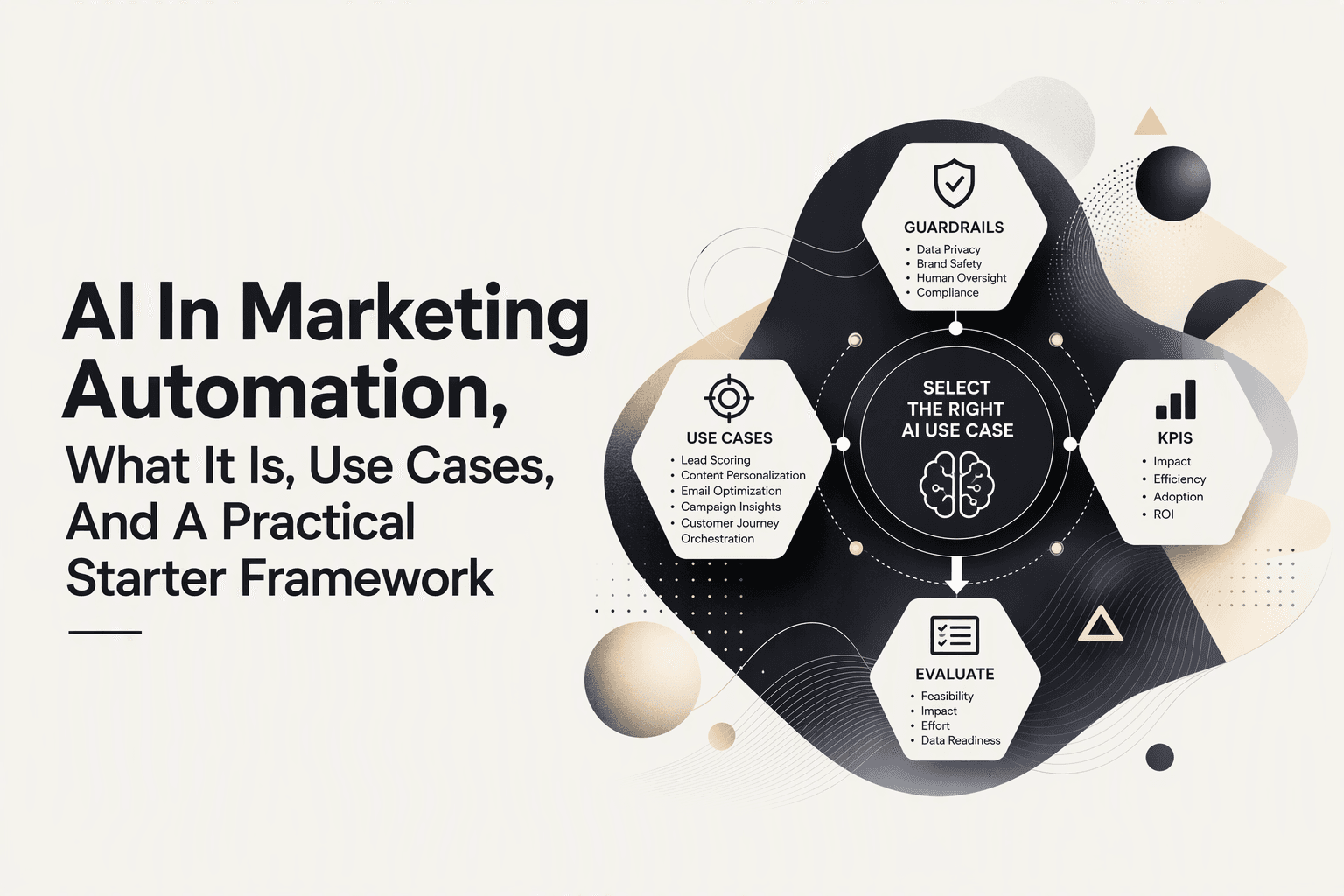
What AI in marketing automation is, and how it differs from rule-based automation
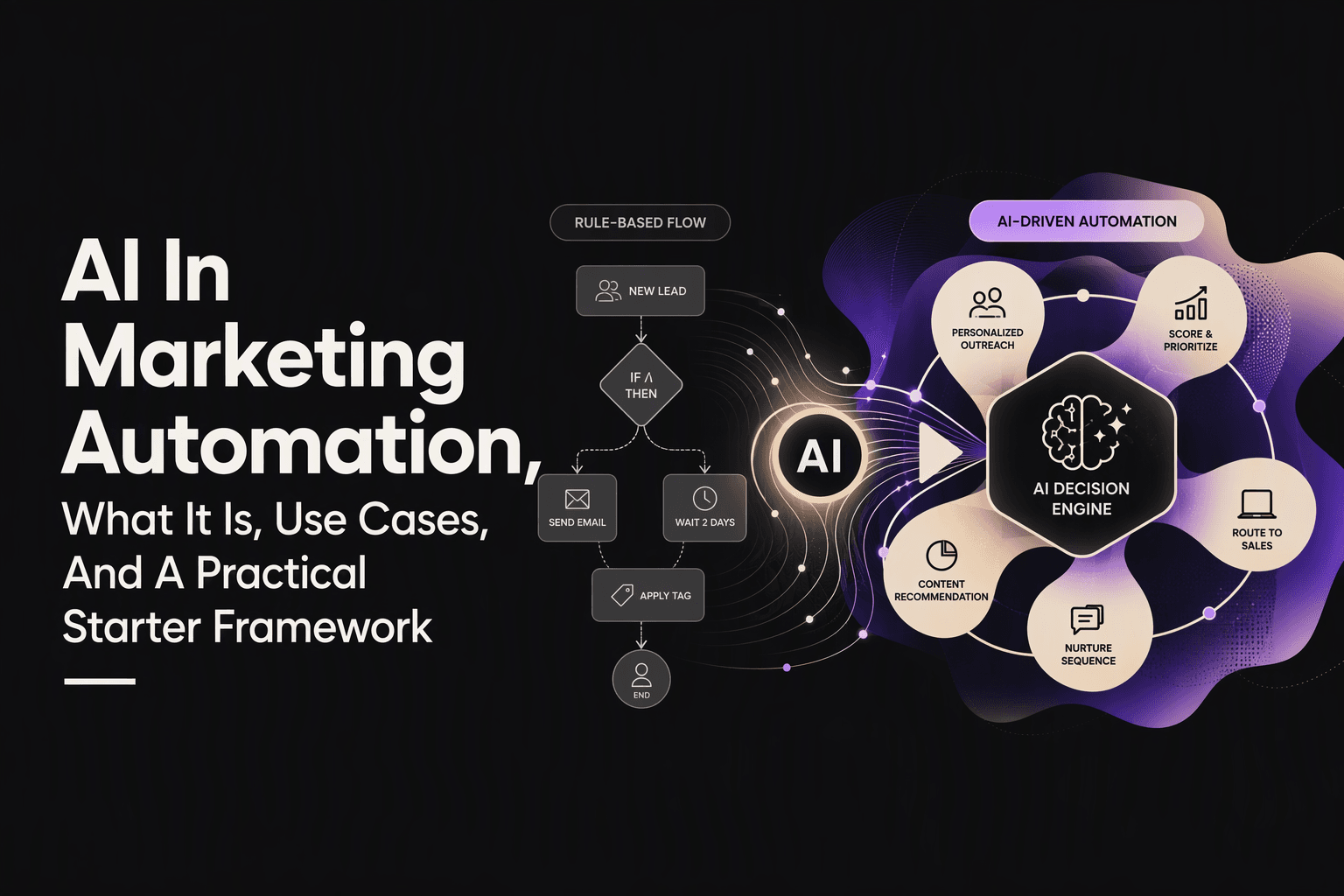
AI in marketing automation is best understood as “automation that can interpret or generate,” while rule-based automation is “automation that can route or schedule.” Both have a place, and most high-performing systems use a hybrid.
| Dimension | Rule-based automation | AI-driven automation |
|---|---|---|
| Logic | Deterministic if-then rules | Probabilistic inference and generation |
| Best for | Routing, scheduling, compliance-safe sequences | Personalization at scale, prediction, content variation |
| Data needs | Clean fields and clear triggers | Clean fields plus context (text, behavior patterns) |
| Failure mode | Does nothing when conditions are missed | Produces plausible but wrong outputs or overfits to noise |
| Governance | Versioned rules, QA | Versioned prompts/models, QA, and review thresholds |
A practical mental model: use rules for “should this happen,” and AI for “what should it say” or “what is most likely to work.” That split keeps your system predictable while still gaining the upside of relevance and speed.
A simple taxonomy of AI types used in marketing automation
Choosing the wrong type of AI for the job is the fastest path to wasted spend, so a taxonomy helps marketers match capability to risk. The table below maps common AI types to tasks, data needs, and what can go wrong.
| AI type | Marketing tasks | Minimum data/context | Common failure mode |
|---|---|---|---|
| Rules (baseline) | Lead routing, suppression, SLA timers | Accurate fields, clear triggers | Silent gaps when fields are missing |
| Machine learning (predictive) | Lead scoring, churn risk, propensity | Historical labeled outcomes | Bias from skewed history, model drift |
| NLP (understanding) | Intent classification, ticket tagging, call summaries | Text data, taxonomy | Misclassification, edge cases |
| Generative AI (creation) | Ad variants, nurture drafts, landing page sections | Brand voice, offers, constraints | Hallucinated claims, inconsistent tone |
| Agents (orchestration) | Multi-step campaign ops, research-to-publish flows | Clear goals, tools access, guardrails | Tool misuse, runaway actions without limits |
In US and AU B2B contexts, the safest early wins usually come from NLP summarization and structured generation constrained by templates. Predictive scoring can be powerful, but only when you have enough clean historical outcomes and someone owns ongoing monitoring.
Where AI helps most across the B2B funnel, with practical examples
High-impact AI marketing automation use cases share one trait: they improve speed or relevance at a point where delay or mismatch kills conversion. Use the examples below as a menu, but pick based on measurable KPIs.
Lead scoring and prioritization that aligns marketing and sales
Use predictive scoring when you can define an outcome (meeting held, opportunity created) and have enough history to train or calibrate. KPI mapping: meeting rate by score band, time-to-first-touch, and pipeline created per rep-hour. Guardrail checklist: exclude protected attributes, monitor drift monthly, and keep a rule-based backstop for high-intent behaviors (like repeated pricing page views).
Nurture personalization without “random AI email” risk
Generative AI works best when it fills in controlled blanks, for example: industry-specific proof points, role-based objections, or a summary of the last webinar the lead attended. KPI mapping: reply rate, CTR, and unsubscribe and complaint rate. In our experience, constraining generation to approved snippets and claims reduces review time and keeps deliverability stable.
Campaign ops automation that cuts cycle time
Agentic workflows help with repeated operations like turning a brief into channel variants, creating an approval packet, and logging deliverables back into a plan. KPI mapping: brief-to-launch cycle time and number of handoffs. A sanity check: if you cannot describe the steps as a checklist today, an agent will not fix the underlying ambiguity.
Optimization loops that improve performance faster
Use AI to summarize performance, propose hypotheses, and generate the next set of variants. KPI mapping: experiments shipped per month and lift per iteration. Keep humans responsible for choosing what to test so the system does not optimize toward vanity metrics.
Your AI marketing automation toolbox, plus selection criteria for US and AU stacks
Tool selection for AI in marketing automation should start with integration reality and governance, not feature checklists. The shortlist below is a category view, followed by criteria to evaluate what fits your stack.
| Category | What it covers | What to verify before adopting |
|---|---|---|
| CRM and marketing automation | Contacts, lifecycle stages, sequences, routing | Field hygiene, consent flags, audit logs |
| CDP and data warehouse | Identity, events, attribution inputs | Event naming, retention, access controls |
| AI layers (LLM, genAI) | Generation, summarization, classification | Prompt versioning, safety filters, evaluation method |
| Workflow automation and agents | Multi-step orchestration across tools | Retries, approvals, rate limits, observability |
| Analytics and BI | Dashboards, experiment tracking | Metric definitions, source-of-truth alignment |
Buyer checklist for US and AU teams
- Integrations: Can it connect to your CRM, ads, analytics, and content systems without brittle custom work?
- Data privacy and compliance: Can you control access, export data, and keep business data private? (This matters for regulated industries and enterprise procurement.)
- Human review controls: Can you enforce approvals for customer-facing output and log changes?
- Observability: Can you see when a workflow fails, retries, or produces outlier outputs?
- Real-time needs: Do you need sub-minute reactions (intent spikes) or is daily batching fine?
A 30-60-90 day starter blueprint, data readiness checks, and KPI mapping
A phased rollout reduces risk because it proves value on one workflow before expanding across channels and teams. Use this 30-60-90 day plan to keep AI marketing automation measurable and governable.
Days 0-30: pick one workflow and make inputs clean
- Choose one pilot: Examples: lead follow-up triage, webinar nurture personalization, or weekly performance summary.
- Data readiness checks: Required fields populated (role, company, region), consent flags accurate, lifecycle stages consistent, and UTM conventions standardized.
- KPI map: 1 operational KPI (cycle time, hours saved) + 1 business KPI (meeting rate, CTR, conversion rate).
Days 31-60: add constrained AI and a review threshold
- Constrain generation: Use templates, approved claims, and style rules.
- Define a review rule: What must be approved before sending or publishing?
- Run an evaluation loop: Spot-check a sample weekly for accuracy, tone, and compliance.
Days 61-90: scale to a second channel and automate reporting
- Expand scope carefully: Add one more channel (for example, ads after email) using the same constraints.
- Close the loop: Write results back to a table or dashboard so learning compounds.
- Document ownership: Name a workflow owner and a reviewer, and keep a change log for prompts and rules.
Governance and the 30 percent rule, how to keep humans in the loop
The 30 percent rule for AI in marketing automation is a practical governance threshold: if an AI output influences customer-facing claims, segmentation, or spend allocation by more than roughly 30 percent, a human should review it before it ships. The exact percentage is less important than having an explicit boundary that prevents silent risk from creeping into the system.
How to translate the rule into guardrails
- Always review: New offers, pricing language, legal or compliance claims, and any copy that references competitors or sensitive categories.
- Review on change: If the model, prompt, or data source changes, require review for the next batch until quality is re-validated.
- Auto-run with monitoring: Formatting, summarization, tagging, and internal briefs can usually run without approval if you sample-check outputs.
Advanced teams treat “human in the loop” as a trigger, not a person: define objective conditions that force review. After running multiple workflow audits, the pattern was clear: reviewers burn out when everything needs approval, but quality improves when review is reserved for high-impact deltas (new claim, new segment, new channel, or unusually confident score shifts).
Skills and learning pathways for AI marketing automation roles
AI in marketing automation requires a blend of marketing ops discipline and basic AI literacy, and the fastest way to build it is by shipping small portfolio workflows with measurable outcomes. Below is a role-based skill map plus reputable starting points.
Marketing ops and lifecycle marketers
- Core skills: data hygiene, segmentation logic, consent and preference management, deliverability basics, experiment design.
- Portfolio project: build a nurture flow that uses a constrained AI summary of the lead’s last interaction, then track CTR and unsubscribe rate by variant.
Demand gen and content teams
- Core skills: message frameworks, offer clarity, template design, QA checklists, channel adaptation.
- Portfolio project: create an “ad variant matrix” workflow where AI generates controlled variations, then evaluate performance by angle not just by copy.
Analytics and growth
- Core skills: KPI definitions, attribution inputs, cohort analysis, evaluation harnesses for prompts/models.
- Portfolio project: set up a weekly insight loop that summarizes performance and proposes testable hypotheses, then track experiments shipped per month.
For foundational learning, start with vendor-neutral resources on machine learning concepts and LLM evaluation, and practical guidance on privacy and security controls. For example, NIST’s AI Risk Management Framework is a useful reference for governance language you may need in procurement and internal reviews: NIST AI Risk Management Framework.
Frequently asked questions
What is the simplest definition of AI in marketing automation?
AI in marketing automation is the use of machine learning and generative models to predict, personalize, generate, or optimize marketing actions using data and context, rather than only fixed if-then rules.
Should we start with lead scoring or content generation?
Start with the use case that has clean inputs and clear success metrics. Many B2B teams begin with constrained content generation (templates and approved claims) or NLP summarization because it is easier to govern than predictive scoring, which needs reliable historical outcome data.
How do we keep AI-generated content compliant and on-brand?
Use templates, approved snippet libraries, and an explicit review threshold for anything customer-facing. Log prompt and model changes, and sample-check outputs weekly, especially after any workflow changes.
What KPIs prove ROI for AI marketing automation?
Pair one operational KPI (hours saved, cycle time, error rate) with one business KPI (meeting rate, conversion rate, CTR, pipeline influenced). If you cannot tie a workflow to at least one measurable business outcome, keep it in a limited pilot.
If you want to turn one pilot journey into an agentic workflow without rebuilding your stack, map your “decision sentence,” inputs, and review threshold, then explore how Diaflow’s workflow automation approach can run that process in one place. A lightweight next step is to watch an introduction or book a demo to pressure-test whether your first use case is ready to automate.