Supercharging Diaflow with Jev: High-Velocity, Type-Safe Evaluation Across Studio and Tables
23 SEPT 2026
Building scalable automations has always required balancing two competing priorities: speed of execution and rock-solid reliability. As workflows grow in complexity, relying on traditional chains of filter nodes, cascading if/else branches, or erratic unstructured LLM outputs introduces latency, unnecessary token costs, and brittle edge cases.
Today, we are thrilled to announce that Jev (Typesafe) is officially available on Diaflow.
Whether you are coordinating autonomous AI agents inside Diaflow Studio or processing tens of thousands of records in Diaflow Tables, Jev brings deterministic, ultra-fast, and strongly typed evaluation directly into your daily workflow.
What is Jev?
Jev is an ultra-performant, type-safe evaluation engine built for rapid decision routing, quantitative scoring, and structured extraction. Instead of wrestling with unpredictable natural language replies or managing tangled condition trees, Jev provides a structured schema contract for evaluating context.
At its core, Jev delivers three major advantages:
1. Guaranteed Type Safety: Every evaluation question conforms strictly to an agreed-upon schema (categorical, numeric, or string). There are no malformed JSON blobs, hallucinated keys, or broken downstream branches.
2. Sub-Millisecond Decision Velocity: Jev cuts down execution time by resolving complex logic in-memory. This eliminates the multi-hop overhead that typically bogs down iterative loops.
3. Consolidated Multi-Criteria Outputs: Rather than stringing together three separate filter nodes to evaluate a single event, a single Jev node evaluates multiple dimensions in parallel and emits a unified JSON object.
Deep Dive: The 3 Evaluation Types in Jev
When configuring a Jev node, the Type selector defines the output contract and scoring behavior for each question item:
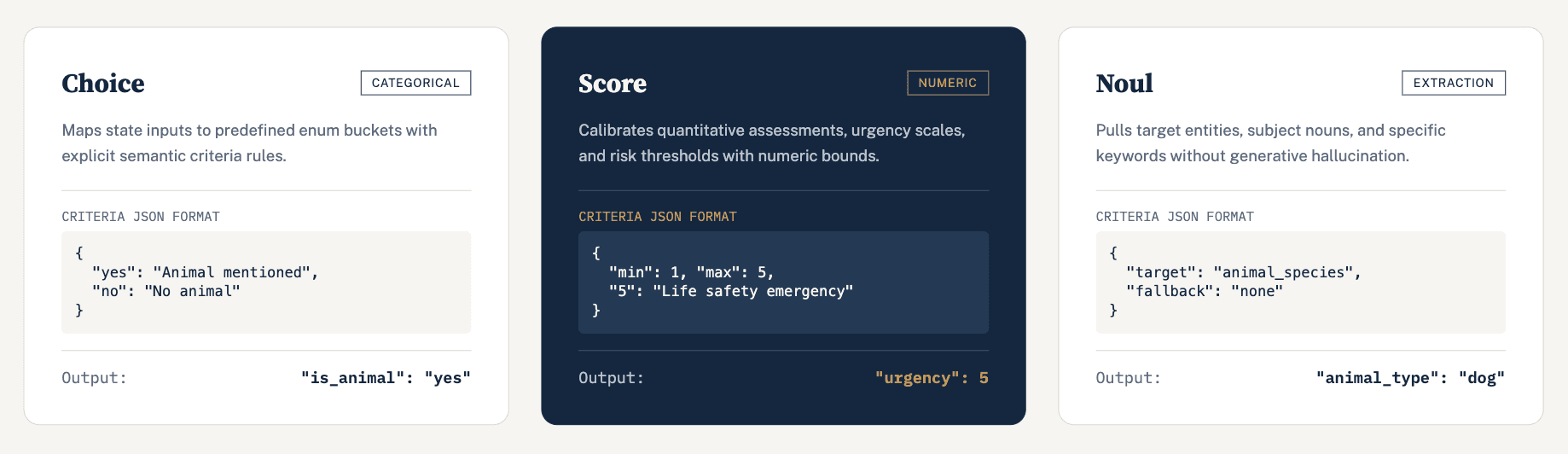
1. Choice (Categorical Classification)
Use Choice when you need deterministic classification into predefined buckets, such as intent detection, binary flags, or routing paths.
- Purpose: Maps incoming context directly into one of your allowed options.
- Criteria Format: A JSON map defining permitted keys and matching rules:
{
  "yes": "The input explicitly mentions dogs, cats, or other animals",
  "no": "The input does not mention any animal"
}- Output Format:
{
  "is_animal_related": "yes"
}- Downstream Use: Wire the output straight into Router or Condition nodes to trigger dedicated workflow branches based on the returned key.
2. Score (Quantitative / Numeric Evaluation)
Use Score when you need Jev to assess intensity, sentiment strength, priority, confidence, or risk on a defined numerical scale.
- Purpose: Returns a validated number based on concrete evaluation boundaries.
- ID Example:
urgency_score,risk_level,sentiment_rating Instructions Example:
"Rate the urgency of this support ticket from 1 to 5, where 1 is non-critical and 5 requires immediate intervention."
- Criteria Format: Define scale intervals or numeric constraints in JSON:
{
  "min": 1,
  "max": 5,
  "1": "Informational inquiry or standard question",
  "3": "Moderate issue impacting normal usage",
  "5": "Life safety, severe financial loss, or critical system outage"
}- Output Format:
{
  "urgency_score": 5
}- Downstream Use: Run direct numeric checks in subsequent Condition nodes (for example, routing
urgency_score >= 4to an immediate on-call notification and< 4to a standard ticketing queue).
3. Noul (Entity / Target Extraction)
Use Noul when you need to extract specific entities, identifiers, or names directly from context rather than assigning a fixed label or score.
- Purpose: Pulls identified targets, subjects, or structured strings cleanly out of the payload.
- ID Example:
extracted_subject,animal_type,location Instructions Example:
"Extract the specific subject or entity mentioned in the trouble report."
- Criteria Format: Define extraction boundaries and fallback rules in JSON:
{
  "target": "animal_species",
  "fallback": "none"
}- Output Format:
{
  "animal_type": "dog"
}- Downstream Use: Pass values into database inserts, update records, or inject them into agent prompt templates (for example,
"Emergency dispatch for: " + jev-0.result.animal_type).
Unified Node Output Structure
When executing a Jev node configured with multiple questions across these types, the node emits a single, consolidated JSON payload:
{
  "is_animal_related": "yes",
  "urgency_score": 5,
  "animal_type": "dog"
}
Every field is immediately accessible in downstream canvas nodes using the standard dot notation: jev-0.result.<ID>.
Where to Use Jev in Diaflow
1. In Studio: Accelerate Loops and Eliminate Node Clutter
Traditional workflow canvases often require chaining multiple filter and if/else nodes to evaluate conditions within a loop. When processing dozens or hundreds of items, each node hop introduces latency and clutters the visual canvas.
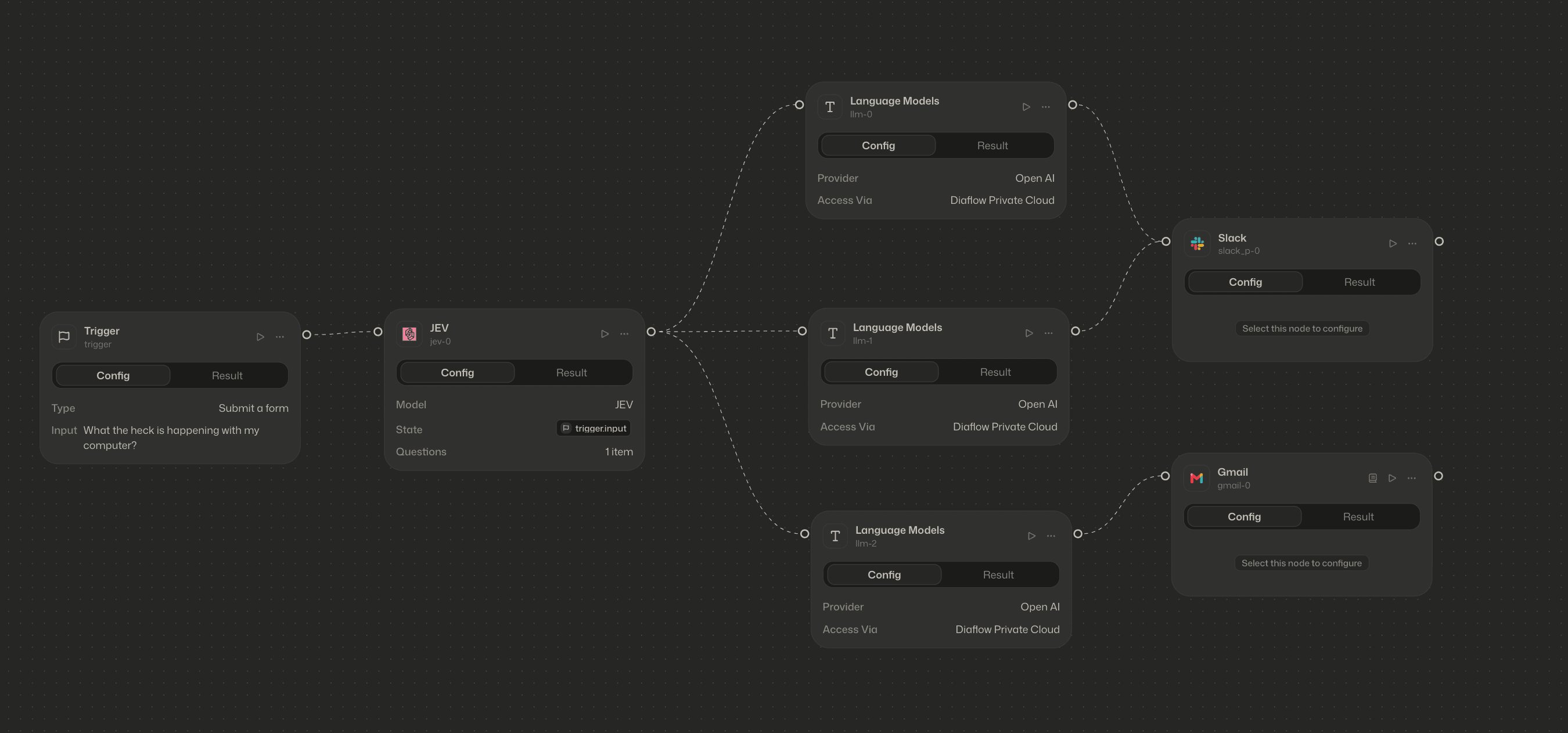
By using Jev in Studio, you can evaluate multiple conditions, scores, and entity extractions simultaneously in a single step.
- Why it matters: Jev evaluates conditions in-memory, accelerating loop cycles and replacing sprawling cascades of conditional blocks.
- How to use it:
- In the Studio canvas, right-click on an empty space or drag out a connection handle from your current node.
- In the node menu search bar, type Jev.
- Select Jev, define your questions across Choice, Score, or Noul, and connect the output directly to your downstream branches.
2. In Tables: High-Speed Bulk Processing
Diaflow Tables powers automated data ingestion, spreadsheet transformations, and batch enrichment. When dealing with uploaded files or large datasets (such as customer feedback files, audit logs, or lead lists), executing evaluations line-by-line via external API calls can create severe bottlenecks.
With Jev inside Tables, you can process bulk files and datasets at native speed.
- Why it matters: Categorize, score, and extract key attributes across thousands of rows concurrently without timeouts or payload errors.
- How to use it:
- Open your target Table and navigate to or add an Action cell.
- Select Run an app from the action configuration panel.
- Choose Jev, select the target columns to evaluate, and run your batch operations across the dataset.
3. More High-Impact Workflows
- Triage and SLA Routing: Ingest incoming tickets or emails, use Score to determine urgency, use Choice to detect department routing, and use Noul to capture the client account name, all in one pass.
- Content Moderation and Risk Guardrails: Scan user-generated inputs for policy violations using binary Choice checks and confidence Scores before payloads touch downstream agent prompts.
- Pre-LLM Data Cleansing: Extract entities and filter irrelevant items prior to prompt assembly, protecting context windows and reducing token costs.
Getting Started
Jev (Typesafe) is now live and available across all Diaflow workspaces.
Open your Diaflow Studio canvas or jump into a Diaflow Table today to experience cleaner architectures, faster loops, and type-safe workflow execution.