AI Agents for Business: How Modern Leaders Deploy Autonomous AI Agent
16 OCT 2026
Stop turning highly paid operators into manual "human middleware." While 88% of enterprises use AI, most are still stuck with reactive chatbots that can't actually execute work. The real leverage isn't prompt engineering - it's deploying autonomous AI agents with persistent memory to handle sales, marketing, and finance end-to-end without writing code.
Key Takeaways:
- Beyond Passive Prompts: Standard AI chatbots remain reactive text toys. True AI agents for business operate as persistent AI agents that own business outcomes, maintain relational state across days, and execute cross-platform tasks autonomously.
- The Departmental Shift: Operational scaling does not come from generic company-wide prompts, but from role-specific digital coworkers (such as Laura: Sales Manager; Liam: Growth & Content Marketing Executive; Marcus: Financial Controller & Strategic Analyst,...)
- The 4-Layer Foundation: An enterprise-grade AI agent requires Deterministic Triggers, Model-Agnostic LLM Reasoning (Claude Sonnet 5.5 / GPT 6.1 Sol), Relational Working Memory (Diaflow Tables), and Bi-Directional System Connectors.
- Bounded Enterprise Governance: Safe operational autonomy is achieved via Hybrid Automation - combining deterministic guardrails with mandatory human-in-the-loop review checkpoints for sensitive business operations
Introduction: The Hidden Cost of "Human Middleware"
According to Asana, knowledge workers spend roughly 60% of their time on "work about work"- coordinating, chasing status updates and searching for information - rather than on the skilled work they were hired to do. Much of that effort is human middleware. Every day, highly paid operators manually copy data from inbound emails into CRM platforms, cross-reference messy vendor PDF invoices against procurement tables, and summarize fragmented Slack threads into executive status updates.
When Generative AI exploded, enterprises rushed to subscribe to generic chat interfaces, expecting immediate organizational transformation. Yet, the operational bottlenecks persisted. Chat interfaces require a human sitting at a keyboard to prompt, inspect, copy, format, and execute every single task. They have no institutional memory, no direct authorization to take action inside core business software, and no dedicated role within the company.
According to the KPMG US Enterprise AI Pulse Survey, 62% of organizations report that they are actively evaluating, piloting, or deploying autonomous agents. However, Gartner predicts that over 40% of agentic AI projects will be canceled by the end of 2027, citing escalating costs, unclear business value and inadequate risk controls. Another common pitfall is that leaders attempt to either write fragile Python scripts from scratch or force conversational bots to execute operational workflows.
The competitive advantage in modern enterprise is no longer prompt engineering-it is organizational architecture. By moving from disconnected AI tools to specialized, autonomous AI agents, companies can automate high-friction workflows without expanding headcounts or writing custom software code.
What Are AI Agents for Business?
AI agents for business are goal-driven autonomous software systems that function as persistent digital coworkers. Powered by advanced foundation models, they perceive business event triggers, break complex enterprise objectives into multi-step actions, retain organizational memory across sessions, and interact directly with business software applications to execute workflows without continuous human prompting.
To understand why this distinction is critical for modern leadership, consider the three evolutionary tiers of enterprise workplace automation:
- Conversational Chatbots (Stateless and Reactive): The user enters a prompt, the model generates an answer, and the session resets. Chatbots cannot proactively read your database, verify an invoice against an ERP record, or follow up on a customer account unless explicitly asked to do so step by step.
- Traditional RPA (Static and Brittle): Legacy robotic process automation scripts emulate human keystrokes. They execute rigid IF-THEN rules, but they lack cognitive reasoning. The moment a supplier changes their invoice layout or a customer replies with nuanced natural language, the RPA script crashes.
- Autonomous AI agents (Stateful and Proactive): These specialized agents combine the cognitive comprehension of modern Large Language Models (LLMs) with deterministic execution rails. They hold a clear departmental job description, read messy unstructured inputs, access persistent relational tables, and independently determine the sequential actions required to achieve a defined business outcome.
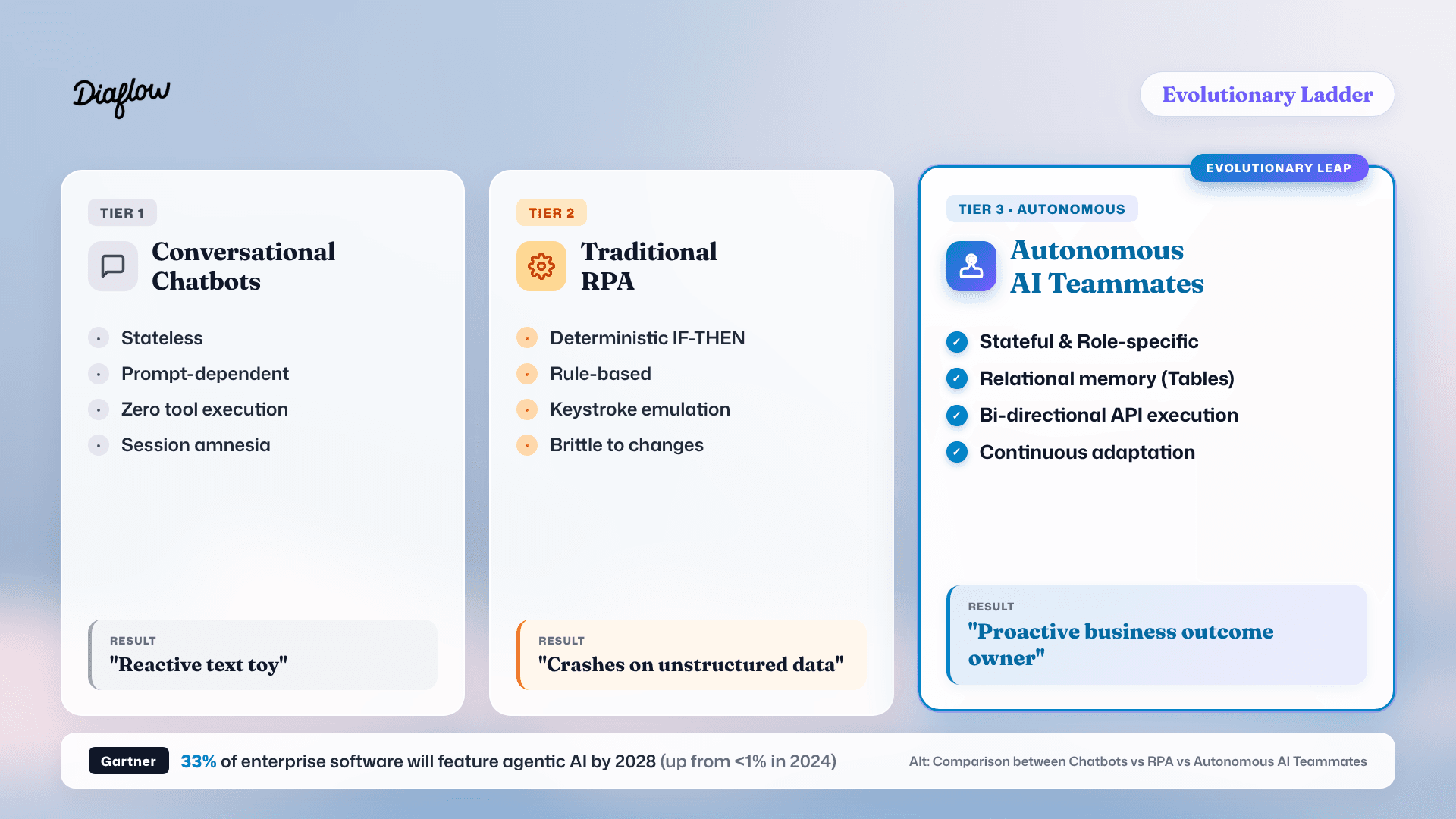
Market data confirms this massive architectural migration. According to Gartner 33% of enterprise software applications will incorporate agentic AI capabilities by 2028, skyrocketing from less than 1% in 2024. Enterprise software is rapidly shifting from passive systems of record (where humans type data) into proactive systems of execution (where AI agents coordinate and execute work).
At Diaflow, this philosophy is foundational: an AI agent should not be a lonely text box on a screen, but a capable digital colleague with specialized skills, clear boundaries, and native software access.
Why Do Companies Need AI agents?
Companies need autonomous AI agents because human workforces are overwhelmed by cross-tool administrative friction, while generic AI tools lack the institutional context and integration authority to execute work end-to-end.
Three acute operational bottlenecks are forcing business leaders to adopt AI agents:
1. The Unstructured Data Wall
Modern business runs on messy, unstructured data: incoming sales emails, multi-page PDF statements, ambiguous vendor contracts, and voice memos. Legacy automation tools cannot read this information without extensive manual data entry. Human employees spend hours serving as transcriptionists. AI agents natively comprehend unstructured context, translate it into structured records, and initiate downstream business actions immediately.
2. The Internal Knowledge Silo
Every growing organization maintains Standard Operating Procedures (SOPs). Unfortunately, these SOPs usually sit dormant in internal Notion databases or training manuals that employees forget to consult. An AI agent converts static written playbooks into live, programmatic execution. When an operational event occurs, the agent applies company guidelines dynamically, reducing human compliance drift.
3. The Enterprise IT Bottleneck
Department leaders - whether in Marketing, Sales, or Accounting - understand their domain processes intimately. However, when they want to automate a repetitive workflow, they are placed in a lengthy engineering backlog. Code-first frameworks like LangChain or AutoGen demand experienced software engineers. AI agents built on visual, no-code canvases return operational control directly to the business owners who understand the problem.
This operational reality is underscored by McKinsey's State of AI 2025 survey (November 2025): 88% of respondents say their organizations use AI in at least one business function, yet only 23% report scaling an agentic AI system anywhere in the enterprise, and another 39% have only begun experimenting with AI agents. The missing layer has not been model intelligence; it has been operational tooling.
Treating AI as an isolated chat box forces human professionals to remain manual middleware. Real organizational leverage occurs only when you give the AI a persistent departmental role, direct access to business data, and strict operational boundaries.
How Do AI agents Actually Work?
AI agents operate through an interconnected four-layer architecture that combines deterministic event monitoring, cognitive reasoning, relational memory, and software execution tools into a continuous operational loop.
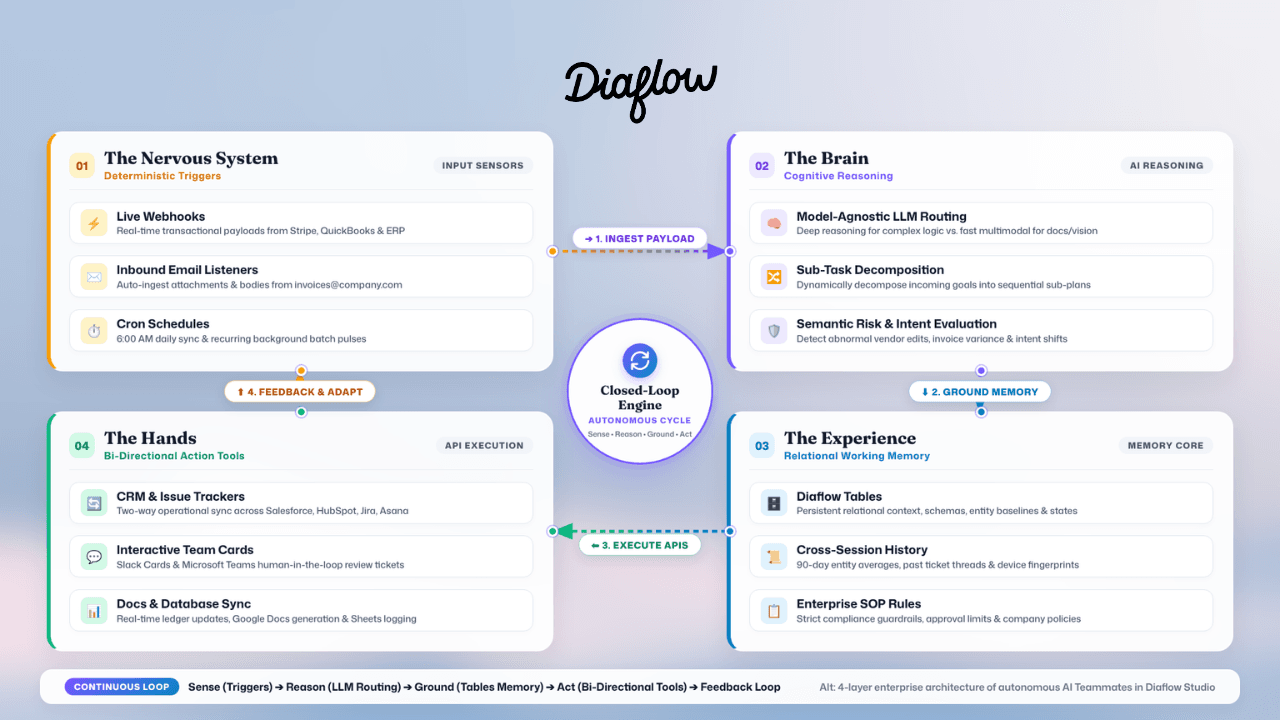
Understanding this architecture demystifies the technology and allows non-technical leaders to design resilient workflows:
Layer 1: Deterministic Triggers (The Nervous System)
An AI agents does not wait around for an employee to type a prompt. It is awakened by specific enterprise events:
- Webhook Listeners: Instant triggers fired when a prospect submits a website form, a payment succeeds in Stripe, or an issue updates in Jira.
- Communication Monitors: Continuous listeners that inspect designated inboxes (such as
[email protected]) or monitor specific Slack channels for high-priority mentions. - Scheduled Cron Automations: Time-based triggers that initiate recurring tasks, such as daily competitive intelligence sweeps at 6:00 AM or end-of-month financial reconciliation runs.
Layer 2: Cognitive Reasoning (The Brain)
Once triggered, the agents process unstructured input using Large Language Models. Rather than relying on a single closed ecosystem, enterprise deployments employ Model-Agnostic Selection:
- High-complexity logical analysis, policy interpretation, and complex coding are routed to reasoning-heavy models
- High-speed document parsing, image recognition, and multimodal tasks can be assigned to fast multimodal models
- The agents decomposes broad objectives into sequential sub-tasks: extracting entities, evaluating confidence scores, and determining necessary tool calls.
Layer 3: Relational Working Memory (The Experience)
A digital coworker cannot be effective if it forgets what happened yesterday. While traditional chatbots suffer from session amnesia, enterprise AI agents utilize persistent relational memory layers like Diaflow Tables:
- Context Retention: The AI agents logs customer touchpoints, past vendor behaviors, and ongoing ticket states.
- Cross-Workflow Synchronization: Multiple agents can read and update the same relational tables, ensuring consistent data across departments.
- Historical Grounding: When evaluating a new transaction or inbound inquiry, the agents queries past operational records to inform its decision-making.
Layer 4: Bi-Directional Action Tools (The Hands)
Intelligence without execution authority is merely commentary. The final layer equips the agents with authenticated API connections to enterprise applications:
- Modifying deal stages and logging enriched company profiles inside HubSpot or Salesforce.
- Creating issues and assigning tasks inside Jira, Linear, or Asana.
- Generating customized, formatted Google Docs, PDFs, and spreadsheets.
- Dispatching real-time notifications and approval requests directly within Slack or Microsoft Teams.
Through platforms like Diaflow Studio, business teams can construct and orchestrate this entire four-layer loop visually on a drag-and-drop canvas. Business leaders configure SOPs by linking nodes and defining prompts in plain English, bypassing the complexity of server provisioning and Python dependencies.
How Can Businesses Hire AI Agents In Diaflow?
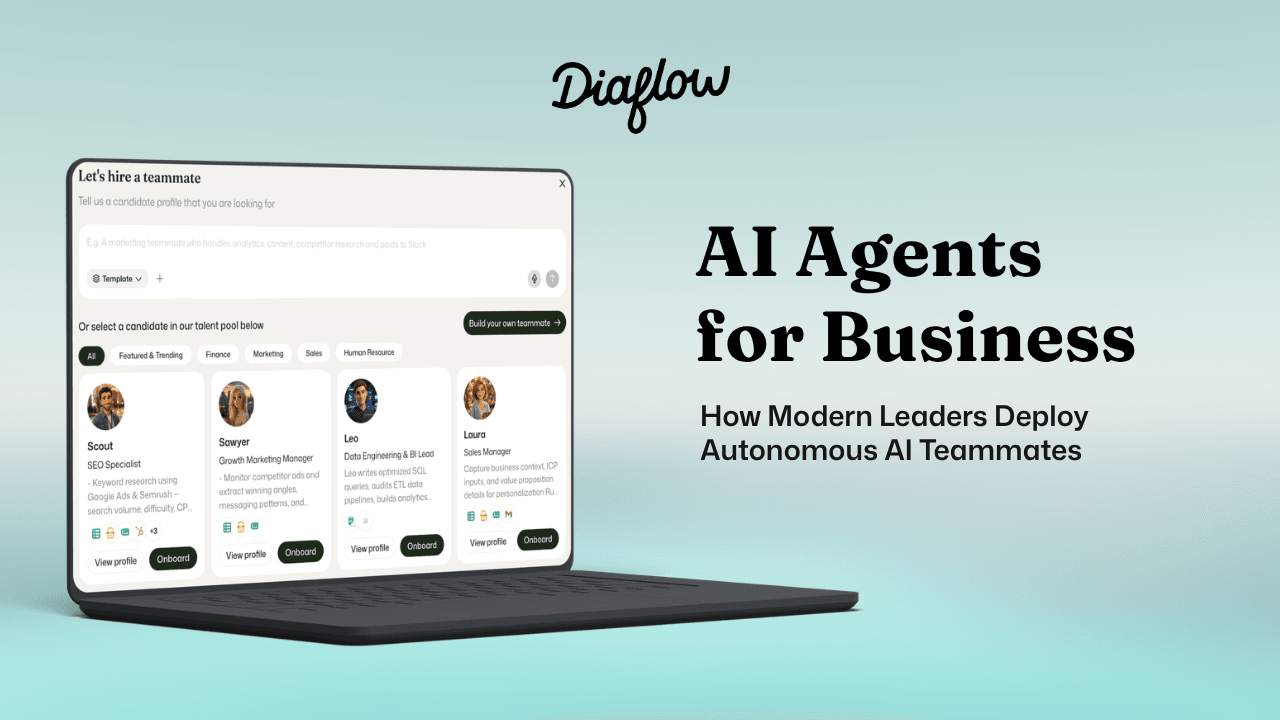
At Diaflow, every agent is a true teammate—so we refer to them as 'Teammates' instead of using the generic term 'agents'.
Rather than deploying one monolithic "all-purpose" bot, high-performing enterprises configure distinct AI Teammates with dedicated personas, specialized tool access, and bounded responsibilities.
Businesses can hire AI Teammates on Diaflow by selecting a role-specialized digital coworker from the Diaflow Marketplace (or creating a custom Teammate), connecting enterprise applications via secure no-code integrations, uploading proprietary SOPs into relational memory tables, and configuring human-in-the-loop approval checkpoints before activating autonomous production.
The Onboarding Paradigm: "Hiring" an AI Teammate is not like subscribing to software; it is onboarding a digital specialist with a clear job description, defined permissions, and operational playbooks.
Organizations can onboard a fully autonomous coworker in under 30 minutes through a structured 5-step onboarding flow:
1. Select Your Role from the Diaflow Marketplace
Browse the Teammates section of the Diaflow Marketplace for roles that fit your departmental bottleneck, or create a custom one. Here are four of the Teammates listed in the Diaflow Marketplace, with the responsibilities listed for each. Triggers and approval gates are example configurations, not built-in settings:
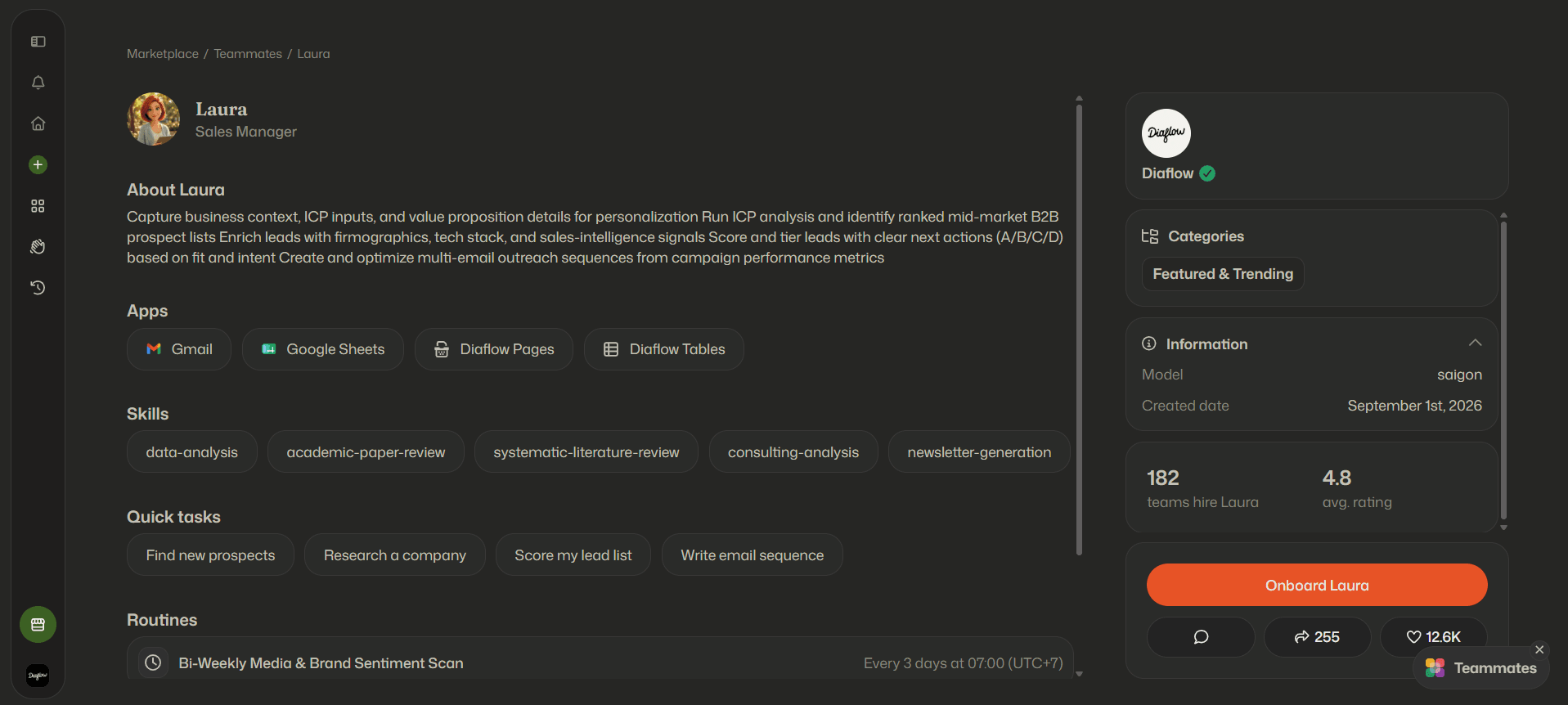
Laura: Sales Manager
- Target Department: Sales and Outbound Prospecting
- Example Triggers: A new campaign brief, an updated ICP, or a new lead list
- Core Responsibilities: Capturing business context and ICP inputs, running ICP analysis to produce ranked mid-market B2B prospect lists, enriching leads with firmographics, tech stack and sales-intelligence signals, scoring and tiering leads (A/B/C/D) with clear next actions, and creating and optimizing multi-email outreach sequences from campaign performance metrics
Human Oversight Gate: Outbound email sequences are approved by a sales lead before dispatch
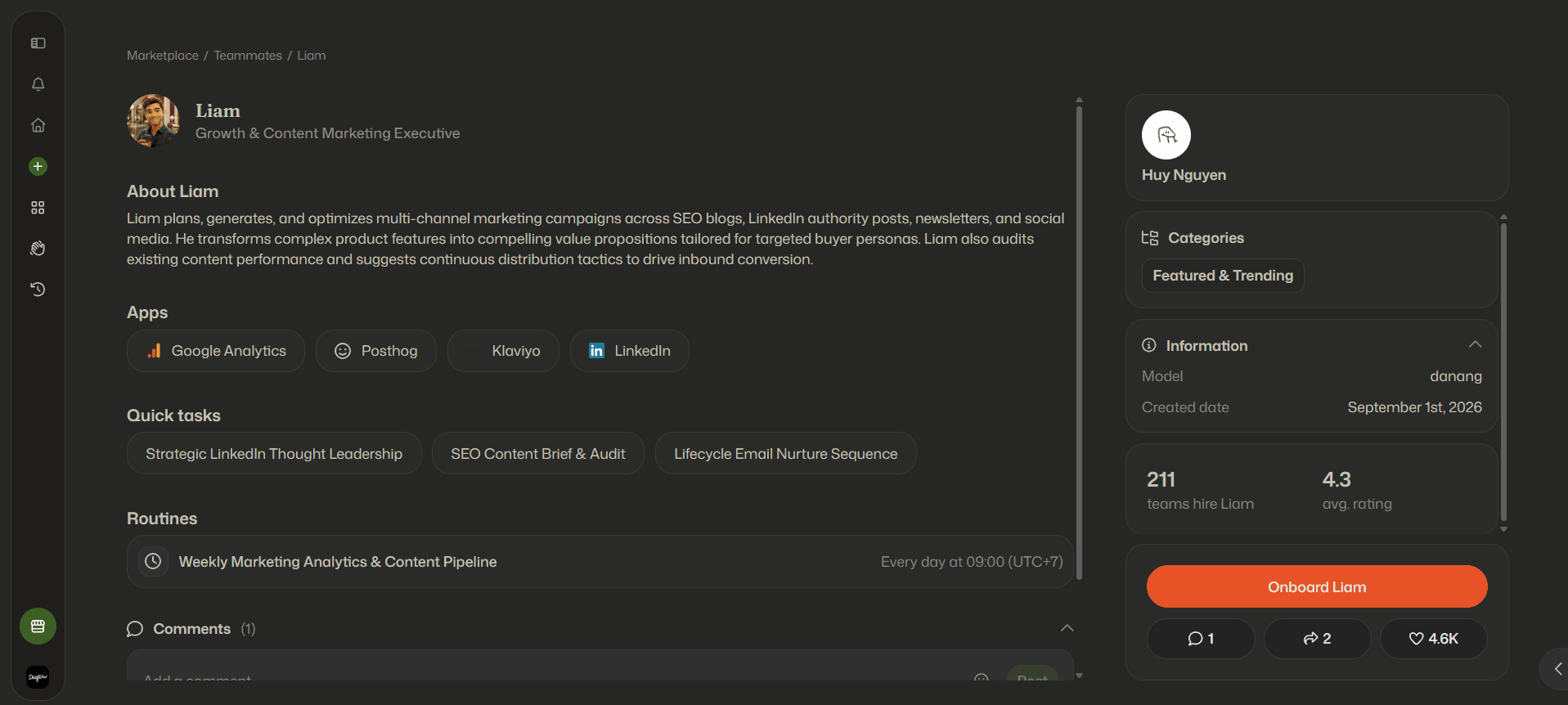
Liam: Growth & Content Marketing Executive
- Target Department: Marketing, SEO, and Content
- Example Triggers: New project briefs, content performance reports, and scheduled editorial reviews
- Core Responsibilities: Planning, generating and optimizing multi-channel campaigns across SEO blogs, LinkedIn authority posts, newsletters and social media, turning product features into value propositions for target buyer personas, and auditing existing content performance to suggest distribution tactics
Human Oversight Gate: Content briefs and final publication assets are reviewed by a marketing lead
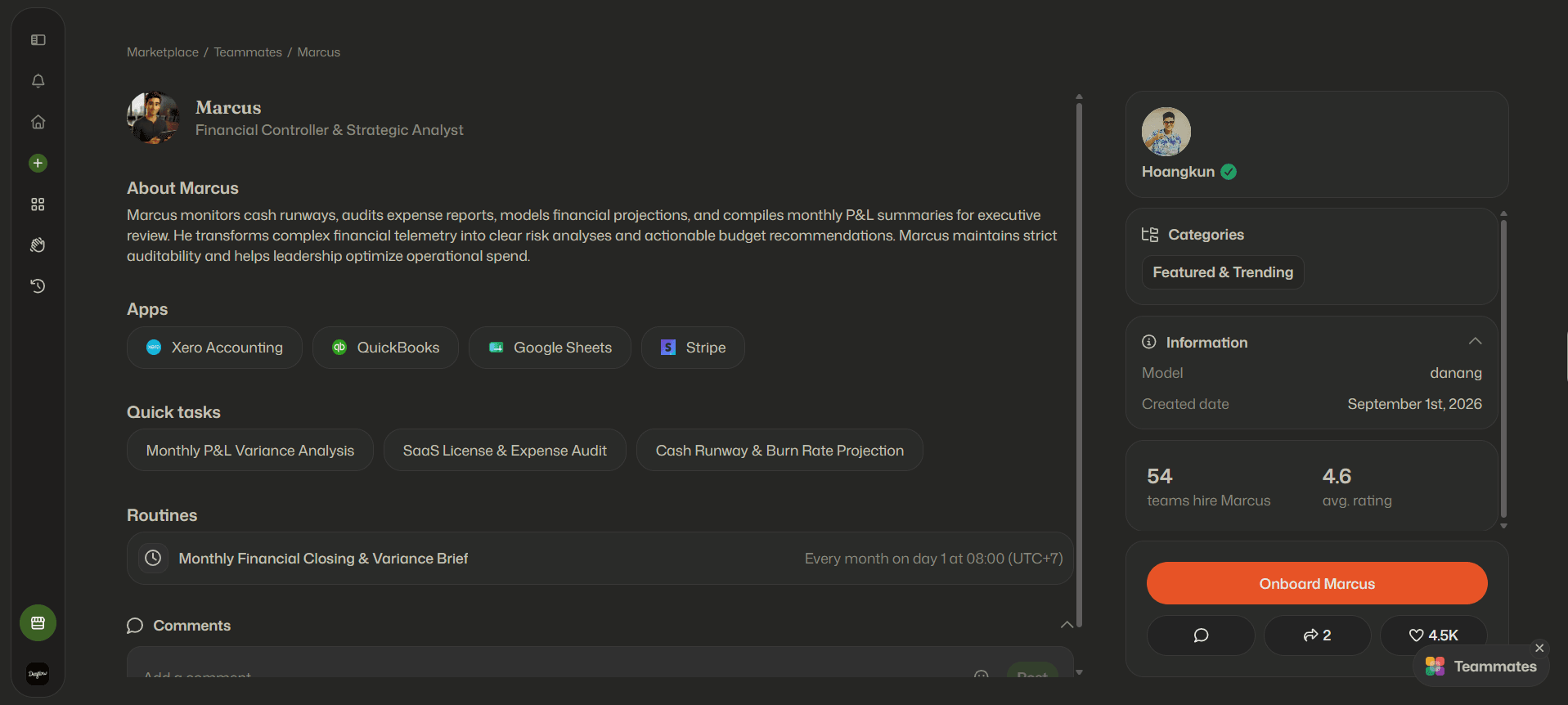
Marcus: Financial Controller & Strategic Analyst
- Target Department: Finance and Accounting
- Example Triggers: A month-end schedule, new expense report submissions, or updated budget data
- Core Responsibilities: Monitoring cash runways, auditing expense reports, modeling financial projections, and compiling monthly P&L summaries for executive review, with risk analyses and budget recommendations
Human Oversight Gate: Any variance above a preset threshold requires finance leadership sign-off in Slack
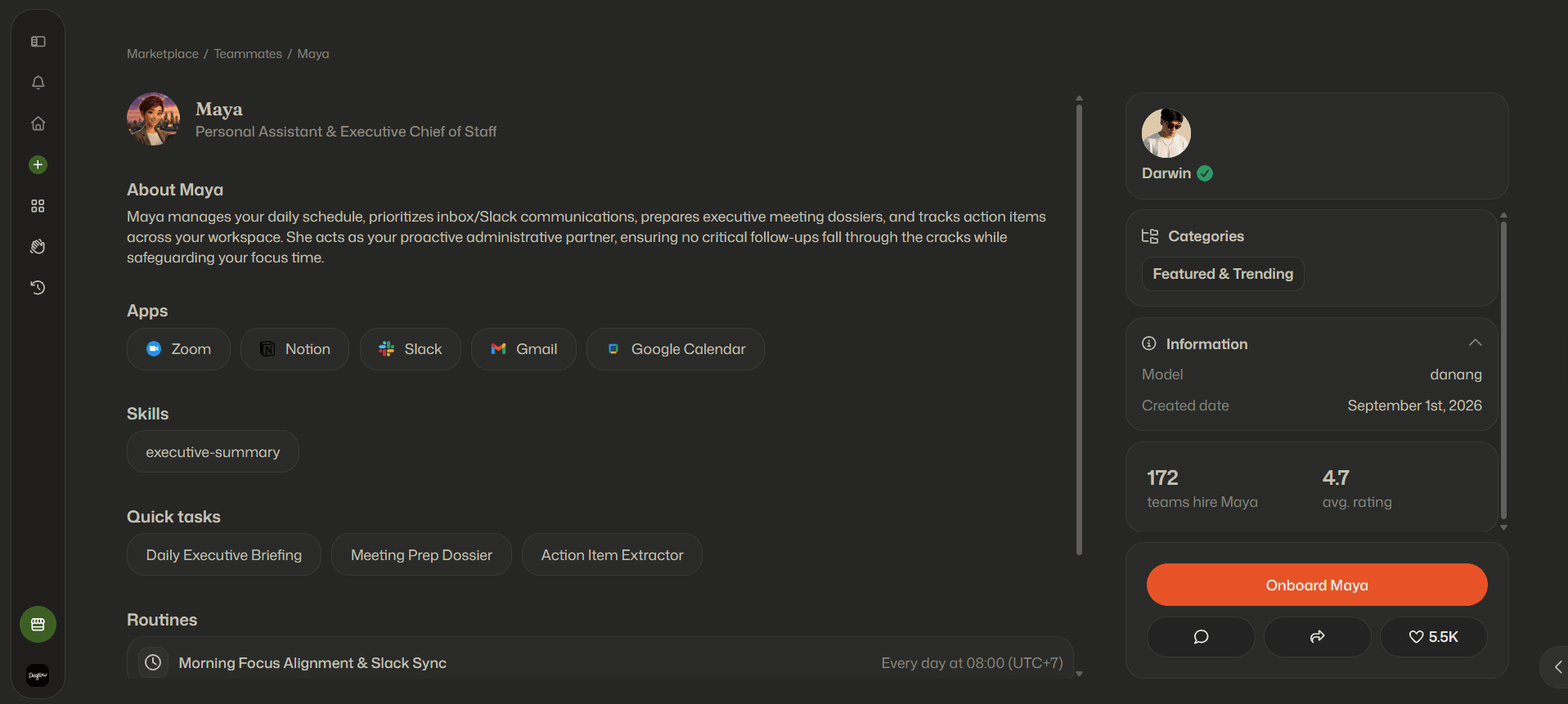
Maya: Personal Assistant & Executive Chief of Staff
- Target Department: Executive Leadership Support
- Example Triggers: A daily morning schedule and new meeting invitations
- Core Responsibilities: Managing the daily schedule, prioritizing inbox and Slack communications, preparing executive meeting dossiers, and tracking action items across the workspace
Human Oversight Gate: Any message sent on an executive's behalf is approved by that executive before dispatch
Other Marketplace roles include: Scout (SEO Specialist), Sawyer (Growth Marketing Manager), Hannah (IT Operations & Systems Lead), David (Legal Operations & Compliance Officer), Chloe (Customer Success & Account Growth Lead) and Elena (HR & People Operations Lead).
2. Connect Your Enterprise Tool Stack
Equip your digital hire with authenticated access to your daily business tools using zero-code OAuth connectors:
- Communication: Connect Google Workspace (Gmail), Slack channels, or Microsoft Teams.
- Core Systems: Authenticate your CRM (HubSpot, Salesforce), project trackers (Jira, Linear, Asana), or ERP software.
- Granular Permissions: Grant least-privilege API access so teammates only read and modify data necessary for their specific job mandate.
3. Ground the Teammate in Company SOPs (Diaflow Tables)
Transform your static internal documentation into actionable working memory:
- Upload company pricing rules, ICP criteria, vendor catalogs, and tone-of-voice playbooks into Diaflow Tables.
- Teammates query these relational records in real time to ensure all generated outputs strictly mirror your company’s institutional knowledge.
4. Configure Human Approval Checkpoints
Maintain total executive oversight by establishing conditional review gates:
- Define validation thresholds: require a human sign-off via a Slack interactive card whenever an invoice discrepancy exceeds $500 or an outbound outreach email targets an enterprise account.
- Teammates pause execution and notify the designated team lead, continuing the automated pipeline only after approval is logged.
5. Run Live Tracing and Activate 24/7 Operations
Before full deployment, trigger simulated operational runs on the Diaflow:
- Inspect real-time execution graphs to monitor token usage, latency, and tool-call accuracy.
- Once validated, activate the teammate’s live triggers to handle end-to-end operational execution around the clock.
Ready to onboard your first digital coworker? Explore pre-configured departmental teammates and operational playbooks at the at the Diaflow Teammates!
How to Deploy Enterprise AI Teammates in Diaflow?
Deploying autonomous AI Teammates does not require a year-long IT transformation initiative. By leveraging visual, no-code orchestration platforms, organizations can safely design, test, and launch their first digital teammate in a matter of hours.
Here is the 5-step operational blueprint for successful enterprise deployment:
Step 1: Target High-Friction Operational Bridges
Avoid the temptation to automate your entire business at once. Begin by identifying an operational bridge - a repetitive, well-defined process that bridges unstructured inputs into structured software records. High-ROI starting points include:
- Vendor invoice processing and ERP entry.
- Inbound sales qualification and data enrichment.
- Support ticket categorization and initial drafting.
Step 2: Define Persona Scope and Operating Boundaries
Treat the AI Teammate as a real employee onboarding into your organization. Draft a clear operational mandate:
- Role and Mission: What specific metric or task does this teammate own?
- Authorized Tools: Which specific APIs (such as read-only CRM access or write access to a specific Slack channel) does the teammate possess?
- Communication Voice: How should the teammate format its outputs and alerts?
- Forbidden Boundaries: What actions must the teammate never take autonomously (such as never executing payments over $1,000 without sign-off)?
Step 3: Connect Triggers and Tables on Visual Canvas
Using a visual agent builder like Diaflow Studio, construct the operational flow without writing code:
- Drag and drop the event trigger (such as New Email Received).
- Route the data through cognitive processing nodes, defining model choice and prompt instructions.
- Connect the output to Diaflow Tables to persist state and maintain an audit history of the transaction.
- Connect downstream action nodes to update your core software stack (HubSpot, Slack, Google Drive).
Step 4: Establish Human-in-the-Loop Review Gates
The key to enterprise confidence is governed autonomy. Insert conditional human review nodes at high-stakes transition points:
- If an AI Teammate's confidence score falls below 90%, the workflow routes the draft to a dedicated Slack channel with interactive "Approve" and "Edit" buttons.
- If a financial disbursement or public email is generated, execution pauses until an authorized human team member clicks approval.
Step 5: Run Edge-Case Simulations and Activate
Before routing live production data to your digital coworker, subject the workflow to rigorous edge-case stress testing:
- Feed the agent malformed PDF documents, foreign languages, and incomplete form entries.
- Verify that error-handling branches trigger gracefully without corrupting database records.
- Once validated, activate the live trigger and monitor the teammate's execution metrics via live visual canvas tracing.
How Do AI Teammates in Diaflow Ensure Security?
Deploying autonomous AI within enterprise operations demands enterprise-grade governance. Handing uncontrolled execution authority to non-deterministic models introduces risks of hallucination, data leakage, and compliance breaches.
Resilient enterprise platforms reduce these risks through Hybrid Automation - an architecture that encapsulates cognitive LLM reasoning within deterministic rails.
[Enterprise Security Triad]
- Bounded Autonomy (Deterministic Sandbox)
- Granular Role-Based Access Control (RBAC)
- Audit Telemetry and Data Protection
Three core governance pillars protect corporate data integrity:
1. Bounded Autonomy via Deterministic Rails
While the AI Teammate uses LLMs for semantic understanding and creative synthesis, outward business actions can be governed by deterministic rules that you configure. For example, a workflow can be configured to halt if an extracted invoice total does not mathematically match its line-item sums, and schema validation can reject outputs that fall outside predefined boundaries. This reduces, but does not eliminate, the risk of hallucinated values.
2. Granular Role-Based Access Control (RBAC)
Enterprise security requires the principle of least privilege. In Diaflow Studio, permissions are compartmentalized:
- Marcus (Finance) can be given access to expense and budget tables and ERP endpoints, while being configured with no access to confidential executive HR records.
- Laura (Sales) can be limited to creating draft contacts in HubSpot, without permission to delete records or export company databases. (Example configuration.)
Human team members only see and interact with the teammates and tables corresponding to their operational clearance level.
3. Real-Time Audit Telemetry
Compliance teams require full transparency into algorithmic decision-making. Enterprise deployments capture comprehensive execution logs for every single transaction:
- The exact user prompt and incoming payload received.
- The model version, token consumption, and execution latency.
- The intermediate reasoning steps.
- The exact API call parameters dispatched to external systems.
Furthermore, enterprise data privacy is rigorously enforced: customer data processed through isolated runtime sandboxes is never utilized to train public foundation models, ensuring complete compliance with global privacy standards including GDPR and SOC 2.
How Will AI Teammates Transform Work?
The era of passive chat interfaces is ending. True operational leverage comes from deploying autonomous AI agents for business that maintain persistent relational memory, integrate directly into core tools, and execute workflows end-to-end.
By combining cognitive reasoning with deterministic guardrails and human-in-the-loop checkpoints, Diaflow AI Teammates eliminate costly "human middleware" friction. Organizations can now safely automate cross-tool execution around the clock - freeing human operators to focus entirely on high-impact strategy and business growth.
Ready to stop acting as human middleware? Explore pre-configured digital coworkers at the Diaflow Marketplace to launch your first AI Teammate in minutes, or start designing custom workflows on Diaflow Studio today.
Frequently Asked Questions (FAQ)
Can Small Teams Hire AI Teammates / AI Agents?
Yes. Small teams benefit significantly from AI Teammates because visual, no-code platforms allow lean businesses to operate 24/7 across customer support, marketing, and accounting without adding payroll overhead or hiring dedicated software engineers.
How Do Agents Differ From Chatbots?
Traditional chatbots only provide reactive text answers to single-turn prompts with little or no persistent memory. AI agents maintain persistent relational memory, own specific departmental responsibilities, and autonomously execute multi-step actions across your core business software applications.
Which Models Power Modern AI agents?
Modern platforms like Diaflow Studio are model-agnostic. They let you assign leading third-party foundation models, such as current Anthropic Claude and OpenAI GPT models (check the model list available in your workspace), depending on task requirements, execution speed, and cost efficiency.
How Do AI Agents Protect Privacy?
AI agents protect enterprise data through encryption in transit (TLS 1.2+) and at rest (AES-256), role-based access control (RBAC), configurable permission scopes and audit logging. Data sent to third-party LLM providers is also subject to those providers' terms, so review them.
Primary Sources and Verified References
- Gartner Research: Predicts 2026: The New Era of Agentic Automation Begins. Verified finding: 33% of enterprise software applications will incorporate agentic AI capabilities by 2028 (up from under 1% in 2024).
- KPMG US: Enterprise AI Pulse Survey. Verified finding: 62% of US enterprise organizations are actively building, developing, or piloting autonomous AI agents.
- McKinsey & Company: TThe State of AI: Global Survey 2025 (November 2025). Findings: 88% of respondents use AI in at least one business function; 23% are scaling an agentic AI system somewhere in the enterprise; a further 39% have begun experimenting with AI agents.
- Asana: Why work about work is bad (2026). Finding: roughly 60% of time is spent on "work about work."
- Diaflow Security Practices
- Diaflow Docs, Introduction to Diaflow Teammate
- Diaflow Marketplace